
Google AI Mode is a conversational search mode inside Google Search that answers complex questions with a cited AI-written response instead of a list of links.
You ask in everyday language. Google splits the question into parts, searches them at the same time, and writes one answer with links to the pages it used. Follow-up questions keep the thread going, so a search turns into a conversation. It started as an experiment in March 2025 and now runs in over 200 countries.
How AI Mode works
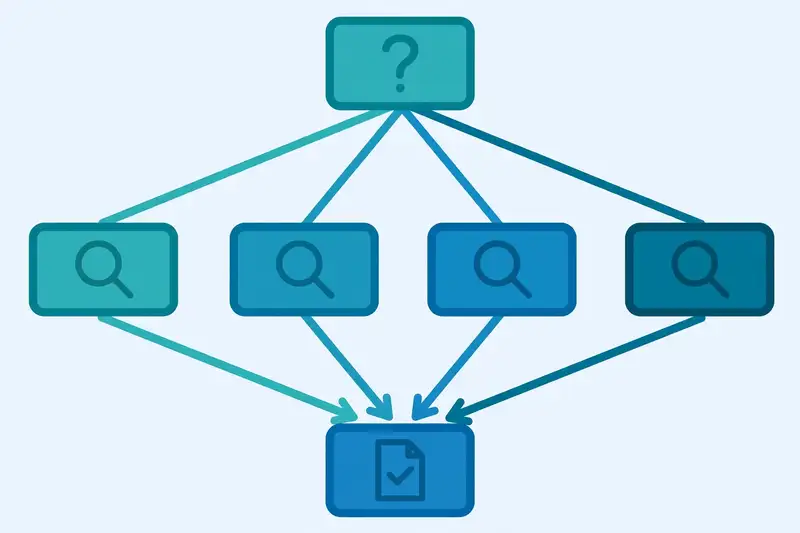
AI Mode breaks your question into subtopics and searches them all at once. Google calls this query fan-out. The results come back together as one written answer, with links behind each claim. Google’s own AI Mode help page describes the same process: divide the question, search the parts at the same time, then bring the results together.
That design suits questions that used to need five or six separate searches: a laptop comparison, a holiday plan with a budget and dates, or an explanation of a hard concept. You push deeper with follow-ups instead of starting over each time.
Google is open about the weak spot. AI Mode can misread a page or miss context, so important facts deserve a click on the source link. Treat the answer as a researched draft, not a verdict.
How to open AI Mode and ask a question
You open AI Mode from the AI Mode tab in Google Search or from the Google app. The Ask anything bar sits at the bottom of the screen. Type a question, or tap the microphone to speak it.
Text is only one input. You can upload images, PDFs and other files, paste a web address and ask about that page, or add open Chrome tabs.
History keeps past AI Mode searches, so you can pick up where you left off, but only when search history and personalized recommendations are switched on.

AI Mode vs AI Overviews vs the Gemini app
Google now offers three AI answers, and they are easy to mix up. The table below sorts them by job.
| Tool | What you get | Best for |
|---|---|---|
| AI Mode | Full conversational answers with follow-ups | Multi-part research, comparisons, planning |
| AI Overviews | Short AI summary above normal results | Quick answers while you still browse links |
| Gemini app | Standalone chatbot for writing and coding | Work that starts from a blank page |
AI Overviews and AI Mode share the same idea, but the depth differs. An Overview gives a short summary above the usual results, while AI Mode takes over the whole page, runs the fan-out search, and answers follow-ups. Our guide to the Google AI Overview update explains how the summary version works.
The Gemini app is a different tool. It is a chatbot for drafting, coding and brainstorming, and it can search the web when you ask. It is not built around Search results the way AI Mode is.
The Gemini vs ChatGPT comparison covers where each assistant fits. Pick by the job: quick fact, Overview; research project, AI Mode; blank-page work, Gemini.

Where did the AI Mode button go?
Some users opened Google in early November and found the dedicated AI Mode button gone from the Search bar. Gadgets 360 reported the change on 4 November, describing it as a limited test that makes AI Mode less prominent for some people on the web.
Google has not said the feature is going away. AI Mode stays reachable through the Search tab and the Google app, and interface tests like this come and go. If your button is missing, check the tab list in Search before assuming the feature was removed.
What AI Mode does well, and where it struggles
Comparisons are its strongest ground. Ask it to compare two products with your budget and priorities, and the fan-out search pulls specs, reviews and prices into one answer. Planning runs close behind: trips, study schedules and meal plans all benefit from follow-ups that narrow the options.
Google has also previewed shopping help inside AI Mode, including a virtual try-on for clothes. TechCrunch covered the US rollout and the shopping features that came with it.
The struggles are real. AI Mode can state a wrong fact with total confidence, and the citations are your only safety net. A few features sit behind sign-in or a paid plan: interactive visuals need a signed-in account in English, and the strongest model needs a Google AI Pro or Ultra subscription. The Ahrefs guide to AI Mode is a useful second read on the same limits.
Who can use AI Mode, and what it costs
AI Mode is free where it is available. It runs in more than 200 countries and over 35 languages, after an expansion in October 2025 that added dozens of new regions. Search Engine Land covered that global rollout as it happened. Google said at I/O 2026 that AI Mode had passed one billion monthly users.
The standard model is the Auto or Fast option. A stronger model, Gemini 4 Argon, is available to Google AI Pro and Ultra subscribers aged 18 and over, with daily usage limits. You pick it from the model menu. Our Google Gemini update guide covers the model lineup in more detail.
Personal Intelligence tailors answers from your past searches and connected apps such as Gmail and Calendar, needs you to be 18 or over with history switched on, and lets you ask AI Mode to remember a detail or forget one. The ChatGPT new features guide shows how the rival assistant handles memory, and the best AI tools comparison puts the whole field side by side. Claude takes yet another approach to the same problem, as the Claude vs ChatGPT comparison explains.
Frequently asked questions about Google AI Mode
Is Google AI Mode free?
AI Mode costs nothing where it is available. A paid Google AI plan only adds the stronger Gemini 4 Argon model and higher limits.
Is AI Mode the same as AI Overviews?
AI Overviews put a short AI summary at the top of normal search results. AI Mode is a separate conversational mode that researches your question in depth and answers follow-ups.
Does AI Mode replace normal Google Search?
Normal Search still exists, and many questions are faster as a list of links. AI Mode fits research and comparison questions where one answer beats ten tabs.
Which AI model powers AI Mode?
The default is the Auto or Fast model in the Ask anything bar. Google AI Pro and Ultra subscribers can also pick Gemini 4 Argon for harder multi-step questions.
Can I delete my AI Mode history?
Open AI Mode history from the left panel and delete single searches or everything at once. You can also delete the activity from your Search History page.
Why can’t I see the AI Mode button?
Google is testing the removal of the dedicated button from the web Search bar for some users. The feature itself is still available through the AI Mode tab in Search and in the Google app.