
Coding AI now means agents that read your whole repo, plan a change, and open a pull request, not just tools that finish your sentences. Two years ago the question was which autocomplete to use. Now the question is which agent to trust with a task, and the answer depends on how you work.
From autocomplete to agents
The first coding AI finished lines. You typed a function name and it offered the body. That was useful, and it is still the daily workhorse: most code written with AI help starts as a completion. The shift came when the tools started reading the whole project. An agent sees the repo and the style, then plans a change across several files. The job moved from typing to reviewing. Developers now spend more time reading AI code than writing their own, and the skill that matters is judgement, not speed.
The four tools that matter
GitHub Copilot is the default. It works in the editor you already use, and Pro costs $10 a month with 1,500 AI credits. Pro+ costs $39, Max $100, Business $19 per seat, and Enterprise $39 per seat. The cloud agent takes a task and opens one pull request per task. GitHub’s Copilot overview covers the plans and the agent.
Codex is OpenAI’s agent, and it comes with ChatGPT. Plus costs $20 a month and includes Codex, which makes it the cheapest serious option for anyone who already pays for ChatGPT. Codex suits larger jobs: a feature, a refactor, a migration. OpenAI’s Codex page describes the agent and its models.
Claude Code runs in the terminal and reads your whole project. Pro costs $20 a month, or $17 billed yearly, and it uses the Opus model with a one-million-token context window. It suits developers who live in the terminal and want an agent that plans before it writes. A Codex versus Claude Code versus OpenCode versus Cursor comparison puts the four side by side on price and workflow.
Cursor is an editor built around AI. Plus costs $8 a month, Premium $30, and Super $100. The low entry price makes it the cheapest way to try an AI-first editor. OpenCode is the free option: open source, free to use, and it connects to more than 75 providers, which suits developers who want to switch models without switching tools.
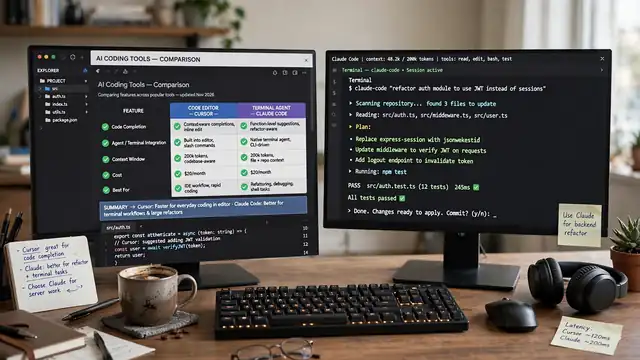
Side by side: price and fit
Price alone misleads, because the cheapest tool is the one you already pay for. ChatGPT Plus subscribers get Codex at no extra cost. VS Code users get Copilot with the least setup. Terminal users get the most from Claude Code. Cursor suits developers who want one editor that does everything.
The real difference is workflow. Copilot fits developers who want suggestions on every line. Codex fits developers who work in batches: describe a task, review the pull request, repeat. Claude Code fits developers who plan in the terminal and want the agent to hold the whole repo in mind. Cursor fits developers who want the editor itself to be the assistant. A roundup of the best AI coding tools compares the same four on price and fit.
Which one fits your work
Beginners should start with Copilot. It explains code as you type, and it works in the editor your course uses. Our what is coding guide covers the basics, and the AI coding assistant guide compares Copilot with Codex in detail.
Solo developers should try Codex first if they pay for ChatGPT, or Cursor if they do not. Both handle whole features, and both cost little to try. Teams should standardise on Copilot, because the business plans add the controls a team needs: usage limits and data policies, plus admin seats.
Terminal users should try Claude Code. The one-million-token window holds large repos, and the agent plans before it writes, which shows in the quality of the diff. Budget users should try OpenCode: free and open source, and it works with the model you already pay for.
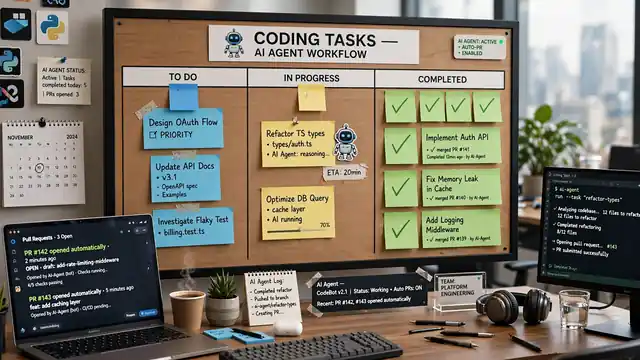
How to pick and switch
Try one tool for a week, on real work, not on a demo. The first day feels fast with every tool. The differences show on day four, when the repo grows and the edge cases appear. Keep notes: how often did the suggestion work first time, how long did review take, and did the tool invent an API that does not exist.
Switching costs little. The tools read the same repo, and your skill transfers: how you prompt, how you review, and how you test stay the same everywhere. The expensive mistake is running three tools at once and learning none of them well. Pick one, use it for a month, then compare. The best AI tools compared roundup lists the coding tools beside the rest, and the Claude vs ChatGPT comparison covers the models behind the agents. The Gemini vs ChatGPT comparison covers the third option, and the ChatGPT new features guide tracks the chatbot behind Codex.

Frequently asked questions about coding AI
What is the best AI coding tool?
It depends on how you work. Copilot fits most developers, Codex fits ChatGPT subscribers, Claude Code fits terminal users, and Cursor fits developers who want an AI-first editor. Try one for a week on real work before you judge it.
Is coding AI free?
Some of it is. OpenCode is free and open source. All three have paid plans, though Codex comes with ChatGPT Plus and Copilot has a free tier with limits. Check the plan page before you commit.
Can AI write a whole app?
It can draft one, but not ship one. Agents handle features and refactors well, yet the result needs review and fixes. The developer still owns the code.
Will AI replace developers?
No. Agents write code fast and review slowly, and they cannot own a decision or a bug. Developers who use them well ship faster. Developers who trust them blindly ship bugs faster.
Which AI coding tool is best for beginners?
Copilot, because it works in the editor beginners already use and explains code as you type. Codex suits ChatGPT subscribers, while Claude Code suits terminal users.
Do I need to know how to code to use coding AI?
Yes, at least the basics. The tools assume you can read code and test it. Learn variables first, then conditions and loops, then use the AI as a tutor.