
An AI coding assistant suggests code as you type, explains errors in plain language, and reviews your work before you ship it. It is not a replacement for a developer. It is a fast junior pair who never sleeps, and who sometimes writes confident nonsense. The skill is knowing when to trust it.
What the assistant does
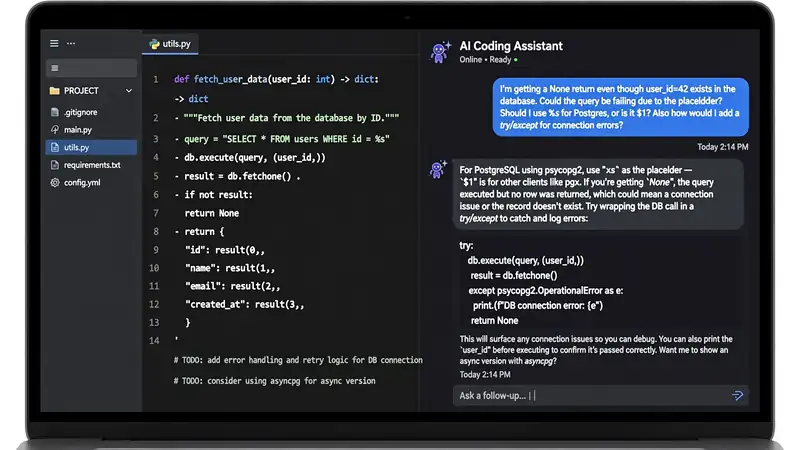
Three jobs, one tool. Completions finish the line you started: you type a function name and the assistant offers the body. Chat answers questions about your code: paste an error, ask why it fails, get a fix with an explanation. Agents take a task and run with it: “add a login page” becomes a branch, a pull request, and a summary. The first two jobs save minutes. The third saves hours, and it needs the most supervision.
The assistant reads your open files and your recent edits. That context is what makes the suggestions useful. A generic chatbot guesses. An assistant in your editor sees the variable names and the style your team uses. The better the context, the better the code.
GitHub Copilot: the default pick
Copilot is the best-known assistant, and the safest first choice. It works in VS Code, JetBrains, Xcode, Neovim or Eclipse, so it meets you in the editor you already use. GitHub’s own Copilot overview covers completions and chat plus the cloud agent.
Pricing is simple. Pro costs $10 a month with 1,500 AI credits. Pro+ costs $39 a month. Business costs $19 per seat a month, and Enterprise costs $39 per seat. The cloud agent takes a task, works on its own branch, and opens one pull request per task, which keeps the review clean. Teams pick Copilot for the same reason they pick GitHub: it is already where the code lives. GitHub’s Business plan page covers the team plans.
Codex: the ChatGPT route
Codex is OpenAI’s coding agent, and it comes with ChatGPT. If you already pay for ChatGPT Plus at $20 a month, Codex is included, which makes it the cheapest serious option for many developers. OpenAI’s Codex page describes the agent and its models.
Codex works best as an agent, not as a completion tool. Give it a task in plain language, let it read the repo, and review the pull request it opens. It suits larger jobs: a feature, a refactor, a migration. The Codex help page explains which ChatGPT plans include it and the limits on each.
The trade-off is the editor. Codex lives in ChatGPT and the terminal more than in your editor, so the completion experience is thinner than Copilot. If you write code in bursts and review in batches, Codex fits. If you want suggestions on every line, Copilot fits better.
Claude Code and Cursor: the challengers
Claude Code runs in the terminal and reads your whole project. Pro costs $20 a month, or $17 billed yearly, and it uses the Opus model with a one-million-token context window, which means it can hold a large repo in mind at once. It suits developers who live in the terminal and want an agent that plans before it writes.
Cursor is an editor built around AI, not an add-on. Plus costs $8 a month, Premium $30, and Super $100. The low entry price makes it the cheapest way to try an AI-first editor, and it suits developers who want completions and chat in one place. Both tools have free options too: OpenCode is free and open source, and it connects to more than 75 providers, which suits developers who want to switch models without switching tools.
How to use one well
Give small tasks, not big ones. “Fix this function” beats “build the app”, because a small task has a clear test: it either works or it does not. A big task drifts, and the drift shows up as code you cannot explain.
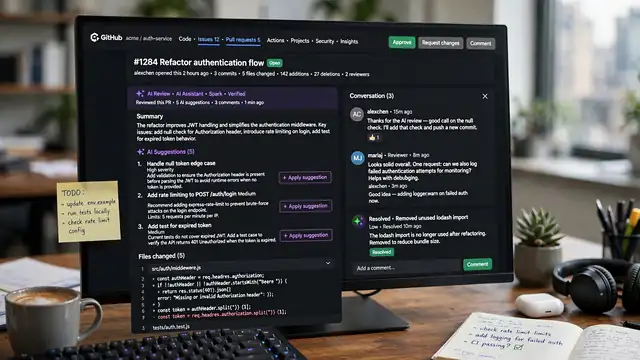
Review every line before you commit it. Read the diff like a colleague wrote it. If you cannot explain a line, do not ship it. The assistant is not responsible for the bug. You are.
Ask for tests. A suggestion that comes with a test is worth more than one that does not, because the test tells you whether the code works. Ask the assistant to write the test first, then the code. Our what is coding guide covers the basics the assistant assumes you know, and the coding AI guide compares the agents beside the assistants. The Claude vs ChatGPT comparison covers the chatbots behind the assistants, and the Gemini vs ChatGPT comparison covers the third option.
Where they fall short
AI assistants invent APIs that do not exist. They call a function with the right name and the wrong arguments, and the code fails at runtime, not at write time. The fix is to run the code and read the error, not to trust the suggestion.
They also repeat the patterns in their training data, including insecure ones. An assistant may suggest a login check that looks right and leaks data. Security review matters more, not less, when the code comes fast. Never let an assistant write auth, payments, or crypto without a human review.
Context has limits too. A one-million-token window sounds large until the repo grows past it, and then the assistant starts guessing about files it cannot see. Keep projects organised, name things clearly, and the assistant stays useful longer. The best AI tools compared roundup lists the coding assistants beside the rest, and the ChatGPT new features guide tracks the chatbot behind Codex.

Frequently asked questions about AI coding assistants
Is GitHub Copilot worth $10 a month?
For most developers, yes. Pro costs $10 a month and covers completions and chat plus the cloud agent. If you write code daily, the time saved on boilerplate pays for it in the first week.
Can an AI assistant write a whole app?
It can draft one, but not ship one. Agents handle features and refactors well, yet the result needs review and fixes. Treat the assistant as a fast drafter, not a developer.
Which assistant is best for beginners?
Copilot, because it works in the editor you already use and explains code as you type. Codex suits ChatGPT subscribers, while Claude Code suits terminal users. Start with the one that fits your editor.
Does Copilot work with my code?
Copilot works in VS Code, JetBrains, Xcode, Neovim or Eclipse, and it reads your open files for context. The suggestions follow your variable names and your project style.
Is my code safe with an AI assistant?
All three vendors publish data policies, and business plans add stricter controls. Read the policy for your plan before you paste private code, and never paste secrets or keys.
Can AI assistants replace developers?
No. They write code fast and review slowly, and they cannot own a decision or a bug. Developers who use them well ship faster. Developers who trust them blindly ship bugs faster.